This document helps you understand and apply dynamic formulas to control the execution of integrations in our system. The formulas make it possible to define logical conditions based on input data, which determine whether an integration will run or not.
Expression Patterns
Expressions are written using placeholders for data and logical or comparison operators to form conditions. Below are the components you can use:
Placeholders
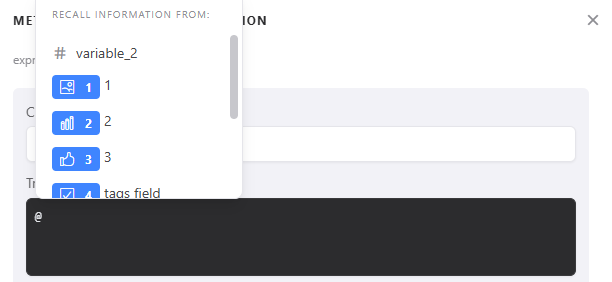
Represented by @, they identify specific data. Examples include @campo1, @hiddenfiled, @utm_source, and @variable_name. In this case, you only need to type @ and the list of fields, hidden fields, UTM parameters, and variables will appear, as shown in the image below:
Boolean Values
TRUE: Represents a true value.
FALSE: Represents a false value.
Logical Operators
AND: Conjunction (and).
OR: Disjunction (or).
NOT: Negation.
Comparison Operators
EQUALS: Equality.
CONTAINS: Contains text.
>: Greater than.
<: Less than.
>=: Greater than or equal to.
<=: Less than or equal to.
ISNOTEMPTY(@Suapergunta): Is not empty.
ISEMPTY(@Suapergunta): Is empty.
Parentheses
Used to change the default precedence of operations, ensuring that specific expressions are evaluated first.
Expression Examples
Type Example Description Simple Expression @campo1 EQUALS "yes"The integration runs if the campo1field equals "yes".Hidden Field Usage @hidden_field EQUALS "iniciante"The integration runs if a hidden field contains the value "iniciante". UTM Tracking @utm_source EQUALS "google"The integration runs if the source UTM parameter is "google". Condition with Variable @score EQUALS "10"The integration runs if a specific variable is set to "10". Compound Expression with Parentheses (@campo1 > 20 AND @campo2 < 30) OR (@utm_campaign EQUALS "launch" AND NOT (@email CONTAINS "@gmail.com")) The integration runs if the campo1question contains a value greater than 20 and thecampo2question contains a value less than 30, or if the campaign UTM parameter equals "launch" and a hidden field named "email" does not contain "@gmail.com".
Explanatory Video
Here is an example of how to send a custom conversion to Meta:
Conclusion
Use this guide as a reference when defining conditions for executing your integrations. Understanding and correctly using operators, especially parentheses, is essential for creating effective and secure control logic.