This article explains how the Send incomplete responses feature works, why it is useful, and how to enable it so your integrations can receive partially completed form data automatically when a user takes too long to finish.
What the Send incomplete responses feature does
The Send incomplete responses feature ensures that if a user who is filling out the form takes longer than a time limit you define, the system automatically sends the data already completed to your integrations.
Why this is useful
Why is this useful?
Normally, responses are only sent when the user completes and submits the form. However, if someone abandons the form halfway through the process, that information would be lost. With this feature enabled, even if the form is not completed, you will still receive the data captured up to that point.
How to enable the option
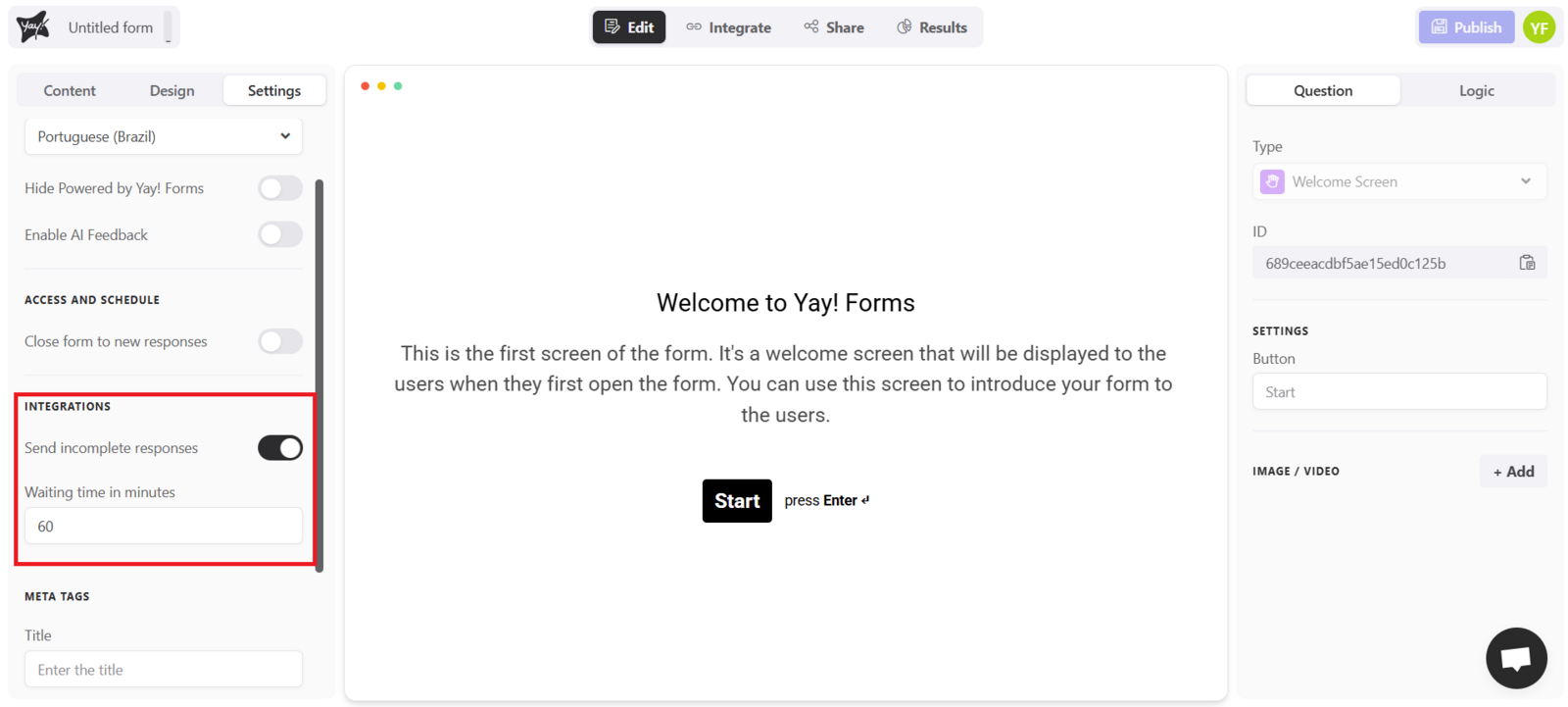
To enable this option, go to the settings tab of your form and enable the "Send incomplete responses" option, as shown in the image below:
Configuring the wait time
Just below, you will find the "wait time in minutes" field, which defines how long the user has from the moment they enter the form until the data is automatically sent to your integration. If the time expires before the person completes the form, partial responses will be sent—remembering that this time is customizable.
Conclusion
By enabling Send incomplete responses and setting a wait time in minutes, you ensure your integrations can still receive the data a user entered even if they do not finish submitting the form within the time you define.