This article will help you connect a Zoho SMTP account in Yay Forms so you can send feedback emails to users, including which connection ports and security options you can use.
Prerequisites
First, you need to understand how to set up and how email feedback works by following this link Como enviar um feedback para o email do usuário.
Connecting your SMTP account in Yay Forms
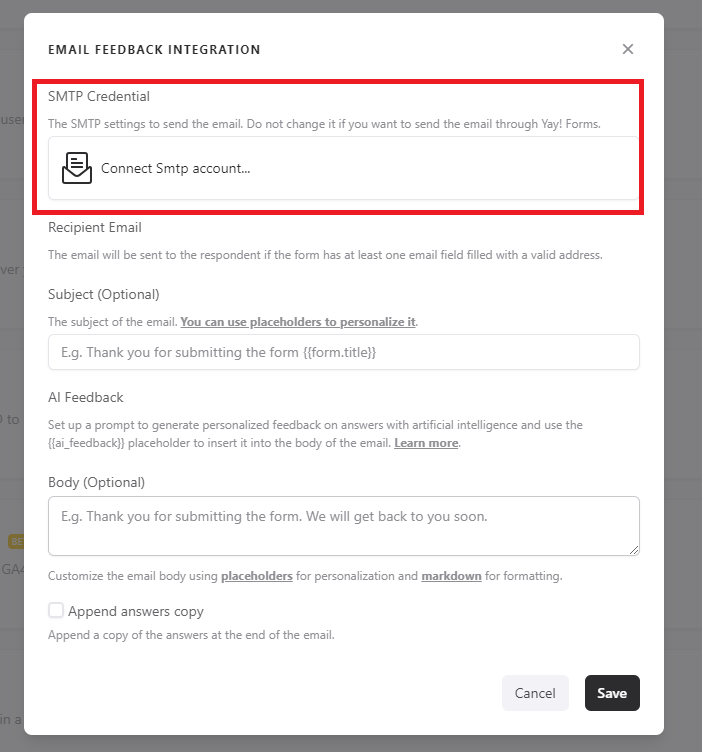
Right after that, you should click Connect SMTP account as shown in the image below:
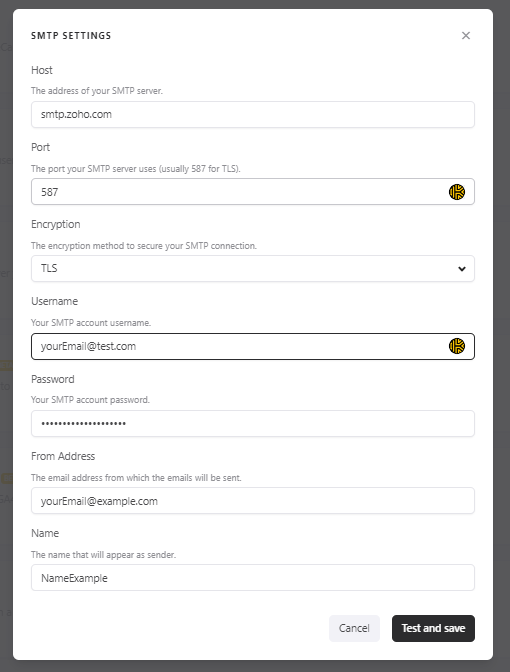
Next, you need to obtain your Zoho email and password. After that, just go back to Yay Forms and fill in the information below.
Remember that you have two connection options: Port 465 with SSL or Port 587 with TLS.
Support
If you have any questions or suggestions, send an email to [email protected].
Conclusion
By following this guidance, you can connect your Zoho SMTP credentials in Yay Forms and choose the appropriate port and security method to enable sending feedback emails to users.